Checking CAD Units and Coordinates Before Combining Discipline Drawings
A practical workflow for verifying drawing units, insertion transforms and coordinate references before using multidisciplinary overlays for engineering measurements.
A practical method for reconciling HVAC equipment symbols, tags and schedule rows into traceable instance counts while exposing duplicates and unresolved discrepancies.
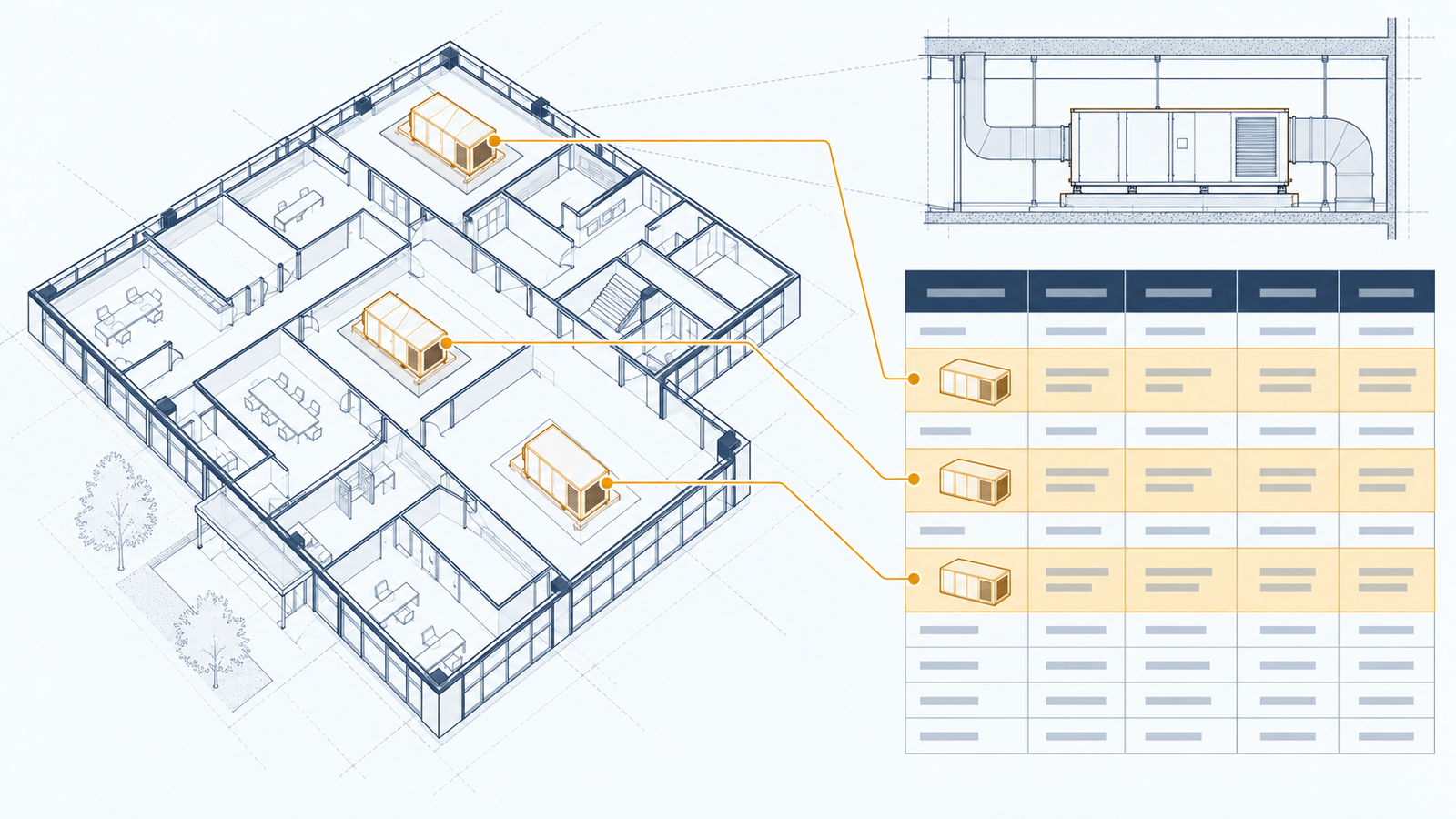
An HVAC equipment count can look convincing while answering the wrong question. A drawing may show the same air handling unit in a floor plan, an enlarged plant-room plan and a section. A schedule may describe a unit type shared by several installations. A legend may contain an equipment symbol that represents no installed asset at all.
The practical task is therefore to reconcile representations of equipment before counting physical instances. This article proposes an evidence-based review workflow for CAD deliverables. It is a quality-control method, not a design standard or an assertion that any particular project's drawings contain these defects.
Begin with a written scope: equipment family, building area, document issue, installation status and intended use of the result. A procurement quantity, a coordination register and an existing-asset inventory can legitimately include different equipment.
For example, a proposed replacement fan and the existing fan scheduled for removal may occupy the same location. Counting both could be appropriate for a demolition-and-installation work register, but misleading in a final installed-equipment total. Preserve their separate identities and statuses before applying the reporting filter.
Record whether future equipment, standby units, tenant-supplied equipment and packaged subcomponents belong in the count. These decisions should come from project documentation or an accountable reviewer. A drafting layer name can help identify a candidate status, but should not silently determine a commercial scope.
Autodesk's DXF reference describes an INSERT as a block reference, with properties including block name, insertion point, scale and rotation. These are representation properties; they do not independently establish an equipment identity. [Autodesk: INSERT (DXF)](https://help.autodesk.com/cloudhelp/2021/ENU/AutoCAD-DXF/files/GUID-28FA4CFB-9D5E-4880-9F11-36C97578252F.htm)
For reconciliation, use three separate concepts:
A block name such as an office's generic fan symbol can indicate a graphical family without distinguishing individual fans. Conversely, different symbols may represent the same equipment in different views. Keep occurrence identifiers separate from engineering tags so that a tag correction does not destroy the record of where an observation came from.
Establish a source register containing drawing identifier, revision, issue purpose, discipline and included view or area. Resolve superseded information before treating an extraction as a current project count. Where an issue conflict remains, identify it explicitly rather than choosing whichever file was processed last.
Autodesk documents extraction from individual objects, drawings and multiple drawings, with options affecting external references and model-space inclusion. It also notes that selecting a drawing can extract objects that are not visible. Extraction scope therefore requires deliberate configuration. [Autodesk: Selecting Sources for Data Extraction](https://help.autodesk.com/cloudhelp/2022/ENU/AutoCAD-Core/files/GUID-B57E9DB5-A4CE-47B7-911F-B607B7564299.htm)
For the proposed review workflow, record these settings alongside the source register. In particular, decide how externally referenced content is handled when both a host drawing and its referenced source are included. Retain the reference path and placement context so that repeated representations can be investigated.
Do not assume that hiding an annotation or switching to a different plotted view changes the underlying population being extracted. Verify the resulting scope against a small, known portion of the drawing set before processing the whole package.
Capture enough information to return a disputed result to its source. A useful candidate record contains:
Preserve the raw text. Normalisation may trim whitespace or standardise an agreed separator, but it must not merge meaningful differences. A project might use similar tags in separate buildings; a short tag alone is then an incomplete matching key.
Label the origin of each value. Distinguish a block attribute from adjacent text, a schedule entry from an inferred classification, and a reviewer decision from an automated association. This lets the next reviewer assess the evidence without having to trust an unexplained final row.
An explicit attribute attached to the relevant block is generally a stronger association candidate than unconnected nearby text, although either can contain an authoring error. A leader, consistent location and matching equipment context can support an association. Distance alone should not decide it.
Consider two nearby fan symbols with tags between them. A nearest-text rule might swap the tags when the annotations are moved for readability. A defensible workflow should retain both candidates and request review if it cannot establish the intended leader or association.
Use drawing conventions to constrain candidate matches, then test those matches against other evidence. Where a symbol lacks a reliable tag, create an unresolved occurrence rather than inventing an equipment number. The system can still preserve its location and graphical context for manual resolution.
A schedule row might identify an individual asset, a shared equipment type, a group of identical units or another project-defined grouping. Inspect the headings, notes and tag conventions before joining it to drawing occurrences.
Autodesk describes extracting block attributes and drawing properties into schedules or bills of materials, and combining extracted properties with spreadsheet information. These capabilities support data collection; the project still needs a rule for interpreting the relationship between each row and the represented equipment. [Autodesk: About Data Extraction](https://help.autodesk.com/cloudhelp/2025/ENU/AutoCAD-Core/files/GUID-B0D32260-45E3-4643-B574-7F6C31579B68.htm)
For an instance schedule, look for a compatible tag within the correct building and system scope. For a type schedule, associate instances with the type while retaining their individual identities. If a quantity column exists, establish whether it is authoritative for the intended report or a separate value to reconcile.
A missing match should remain visible. Do not copy data from a similar tag to make the register appear complete. Equally, a schedule row without a plan occurrence is a discrepancy to investigate, not proof that equipment is missing from the design.
Group occurrences only when the combined evidence supports a common instance. Matching tags are useful, but the grouping should also be compatible with location, source scope, equipment family and document status.
An enlarged plan and its parent plan may depict the same equipment. A repeated typical-floor drawing may instead describe several installations. The reviewer must establish the drawing's repetition convention before translating its content into a building-wide quantity.
Treat conflicting matches as exceptions. Two symbols carrying the same tag in incompatible locations might indicate a copied annotation, a project convention that uses local numbering, or an unresolved coordination issue. Automatically deleting one as a duplicate would conceal the problem.
Likewise, an equipment section can support identity and spatial interpretation without creating another installed item. Keep the section occurrence linked to the instance because it may contain access or arrangement information that the plan lacks.
Assume a hypothetical current drawing package contains eight recognised fan occurrences. Two are legend examples. The remaining six occurrences comprise three uniquely tagged fans on a general plan, two repeated depictions of those fans on an enlarged plan, and one repeated depiction in a section.
Removing the two legend examples leaves six relevant drawing occurrences. After confirming the repeated depictions, those six occurrences correspond to three equipment instances. The arithmetic is eight minus two equals six occurrences; six occurrences grouped by supported identity yield three instances. Grouping is an evidence decision, not an arithmetic deduction.
Suppose the schedule identifies only two of the three tags. The report should retain all three supported instances and identify the third as unmatched to the schedule. Reducing the count to two would hide the discrepancy. Inventing a schedule row would hide it just as effectively.
This example is deliberately limited to document reconciliation. It does not establish that the fans are correctly sized, that the proposed design is compliant, or that the equipment has been installed.
Once identity is established, compare documented properties across sources. Equipment family, system service and duty descriptions are useful checks. A tag that joins successfully to an incompatible equipment description should be flagged rather than accepted because the text key matches.
Compare numerical fields only after confirming their meaning and units. A scheduled airflow, a note describing an operating mode and an equipment's maximum stated capacity may refer to different conditions. A difference between them requires interpretation before it is called an error.
Separate absent data from contradictory data. An empty field means the evidence was not found in the reviewed scope; it does not prove the value is zero. A conflict means two identified sources make incompatible statements under the interpretation being applied.
The appropriate design specialist should resolve questions that require engineering judgement beyond the available documents. A reconciliation tool should make those questions easier to inspect, not produce unsupported design decisions.
Deliver both the equipment register and an exception list. The register should identify included instances and link back to their occurrences. The exception list should include ambiguous tag associations, unmatched schedule rows, conflicting properties and unresolved revision differences.
Record who resolved each exception, what evidence supported the decision and which document issue the decision applies to. A decision on an earlier issue should not automatically remain valid after its supporting drawing changes.
When a new revision arrives, compare more than total counts. An unchanged total can conceal one removed unit and one added unit, a changed tag or a move to another area. Review changed identities, relationships and properties as well as additions and removals.
A repeatable test package can include a legend symbol, a repeated section occurrence, a missing schedule tag and two incompatible occurrences sharing a tag. Check that the workflow exposes each intended exception before trusting larger results.
The useful output is a count with a defined scope and inspectable evidence: which items were included, which representations were grouped, which sources supported them and which questions remain open.
CAD intelligence becomes valuable when it connects drawing occurrences, tags, schedules and document context without pretending that any single source is complete. For HVAC equipment reconciliation, preserving uncertainty is part of producing a usable result. It keeps a polished quantity table from concealing the coordination work that still needs to be done.